AirMic

AirMic · macOS

Your AirPods. Your microphone. One gesture.

AirMic is a free, open-source macOS menu bar app designed to mute and unmute your default input microphone with compatible AirPods stem controls.

Experimental beta · v0.1.0-beta.1. Ad-hoc signed; not Apple-notarized. macOS may require first-launch approval. Stem control worked in the original prototype; the current Swift version still needs physical verification. Compatibility with every AirPods model or calling app is not established.

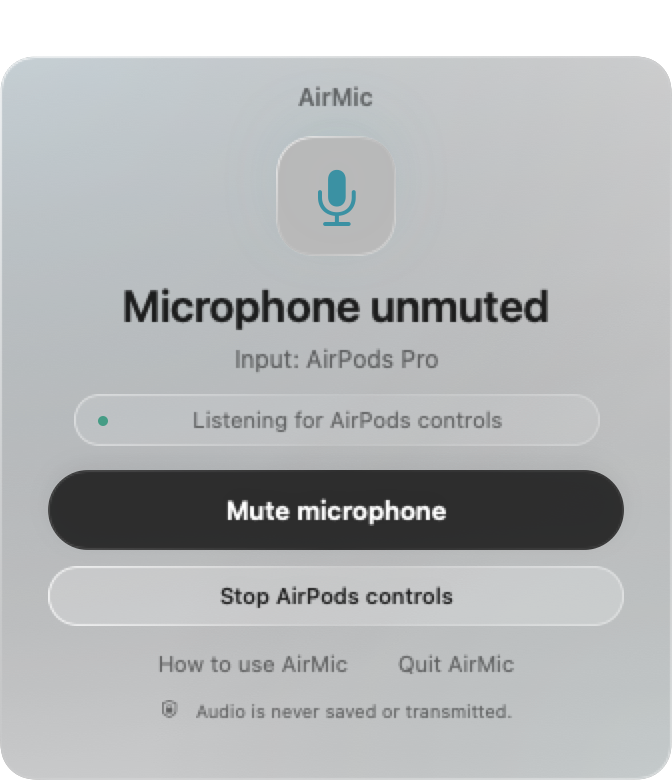
Actual SwiftUI interface with sample state; hardware compatibility is still under verification.

Small app. Clear scope.

  • macOS 14 or later · Apple Silicon and Intel
  • Swift and SwiftUI · MIT license · Free
  • English, Korean, Simplified Chinese, Japanese, Spanish
  • No accounts, telemetry, audio drivers, or network requests

How to install AirMic

  1. Download the universal DMG, open it, and drag AirMic to Applications.
  2. Open AirMic, allow microphone access, and connect your AirPods. Select the microphone you want to control as the Mac’s default input.
  3. Use your configured AirPods mute gesture, or toggle mute from the compact window or menu bar. Quit normally to attempt restoration of the original microphone state.
Apple’s first-launch guidance ↗

Frequently asked questions

Can I mute my Mac microphone with AirPods Pro?

AirMic is designed for compatible AirPods mute events and a microphone with a writable Core Audio mute control. The original prototype was tested with AirPods Pro on one Apple Silicon Mac; hardware testing of the current Swift beta is pending.

Does it mute Zoom, Teams, or every microphone?

It changes the device-level mute state of the current default input. It does not toggle an app’s own mute button or mute all connected microphones. Calling apps may compete for AirPods controls; verify your setup before relying on it.

Does AirMic record audio?

No. It keeps an input audio unit active to receive controls, but does not read, save, transmit, or play microphone buffers. macOS may show its microphone indicator; Bluetooth playback quality and battery use may be affected.

Why does macOS ask before opening AirMic?

This experimental download has an ad-hoc signature, not a Developer ID signature or Apple notarization. Follow Apple’s official instructions for opening an app you trust.